Architecture Shadow is an Affinity script that generates geometric vector shadows from selected walls. Adjust direction, length, and opacity while previewing the result; the original wall shapes remain intact.
Built with the official Affinity SDK, the earlier Wall Shadow 1.1 was tested in Affinity 3.3.3 on macOS. It runs locally and does not require an AI connection.
What it does
The script sweeps each wall outline in the chosen direction, joins the resulting shapes into one vector object, and places it behind the walls. The shadow uses black fill, Multiply blending, and 50% opacity by default. Overlapping wall shadows are combined before opacity is applied, so intersections do not become artificially darker.
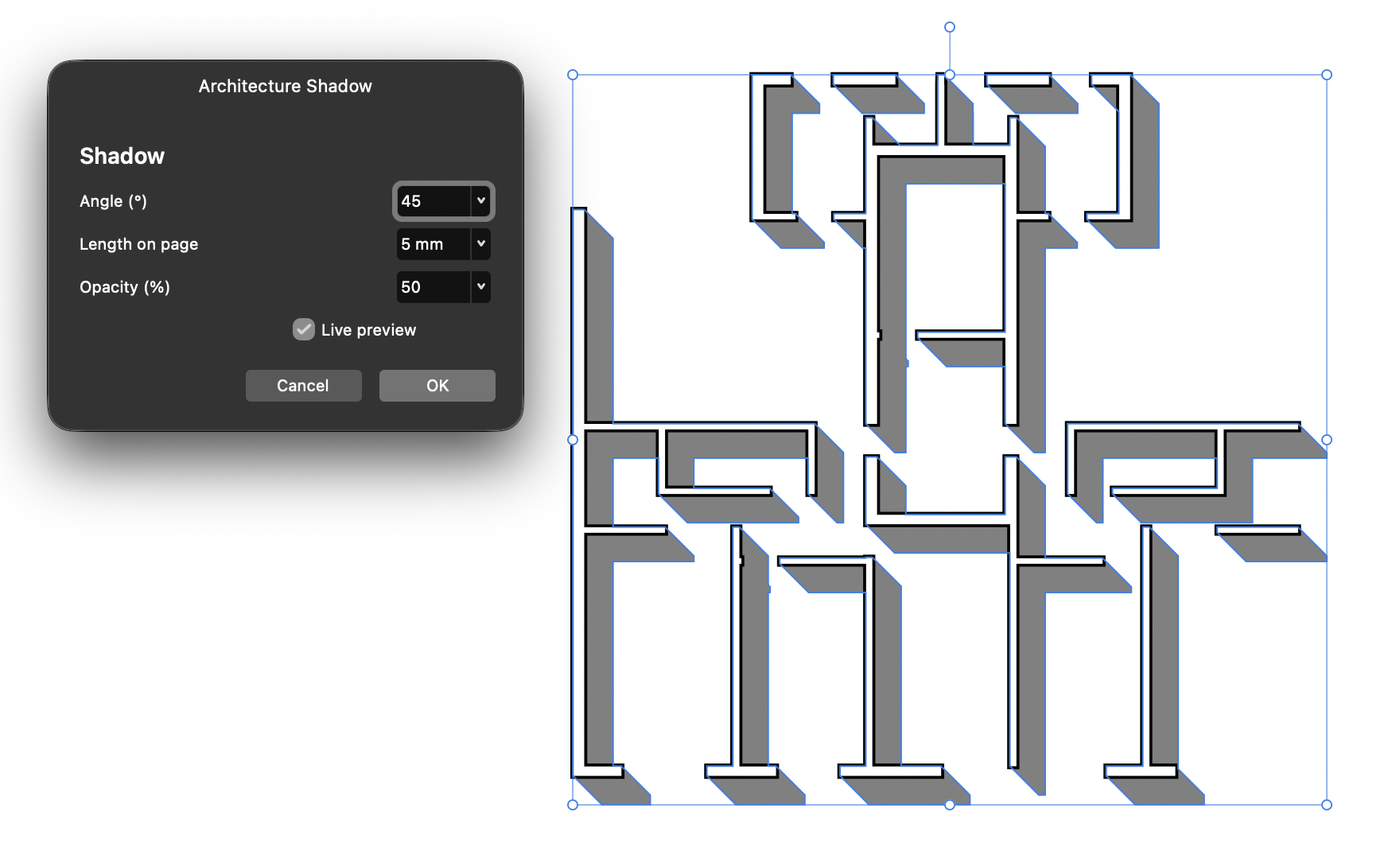
The dialog provides controls for angle, length, and opacity. Open the small arrow beside a value to use its slider, or enter a number directly. Changes update the temporary preview. OK creates the shadow; Cancel removes the preview. A single Undo reverses the confirmed result.
Install and run
- Download the ZIP and extract it. The file you need is
Architecture-Shadow.js. - For regular use, import that JavaScript file into Affinity’s Scripts Panel. You can then run it from your script library. For a quick run, open the file in a plain-text editor, copy all its contents into a new Affinity Script Editor tab, and click Run.
- Before running, open your drawing and select the closed, filled curves representing the walls. Select the curves inside a group rather than the group itself; all selected curves must share a container.
- Run the script, adjust Angle, Length on page, and Opacity while watching the live preview, then click OK. Cancel removes the preview without creating a shadow.
Affinity supports importing scripts and saving them to its Scripts Panel. See Affinity’s scripting overview if you are new to the panel.
Page distance, not real-world height
Length starts at exactly 5 mm and is displayed in the document’s units. You can type another value directly. The script does not calculate a shadow from wall height, architectural drawing scale, or sun position. It is a graphic representation tool rather than a solar study.
Compatibility and limits
The geometry in the earlier Wall Shadow 1.1 passed 23 checks in Affinity 3.3.3.5004 on macOS. It was also tested on copies of 49 curves from a floor plan, including preview, cancellation, and Undo. Architecture Shadow 1.4 fixes curve tolerance at 0.1 px and starts at 5 mm. It has now been opened in Affinity 3.3.3.5004 on macOS: the current screenshot confirms the compact dialog, 5 mm default, and live preview. The full geometric regression suite was not rerun for 1.4. Windows has not been tested.
Polygonal walls produce exact constructed geometry within Affinity’s numerical precision. Curved walls are approximated with vector segments at a fixed 0.1 px tolerance. Advanced users can change CURVE_TOLERANCE_PX near the top of the script. Open paths, stroke-only walls, and selections spanning different containers are not accepted. A 6,000-segment limit prevents excessively heavy operations.
After closing the dialog, the shadow is independent geometry rather than a persistent parametric effect. To try new settings, undo the result and run the script again.
Download
Download Architecture Shadow 1.4 — ZIP
The ZIP contains the complete script and a README with instructions, tests, and limitations.
Technical reference: official Affinity 3.3.3 SDK.